


How to Backup Database File When I Use Network Edition?
If you want to backup your database file of EfficientPIM Network, please do these actions on Server computer and connect to server as administrator.
- Method One
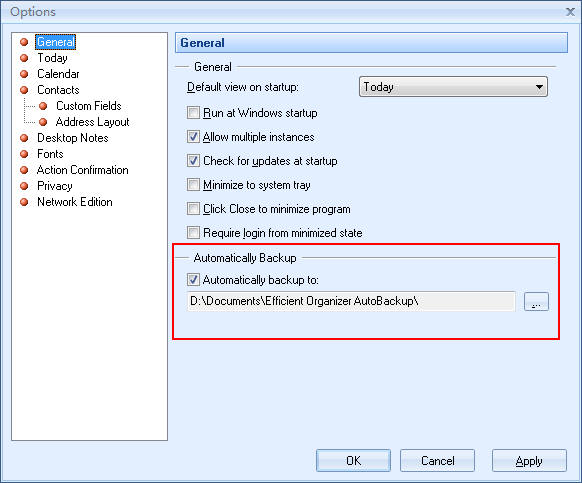
Please click Tools -> Options -> General, and then check Automatically backup to option. After that, you can backup your files to the directory as you set. Generally, the directory is "My Documents\Efficient Organizer AutoBackup".
- Method Two
You can also click File -> Backup to backup file manually. Certainly, you can restore your file by clicking File -> Restore.

- Method Three
Open Efficient Organizer Server. (Usually, it has been minimized to system tray. If you still can't find it, just exit EfficientPIM and rerun it.) And then click Backup Database File.

This article is also suitable for Efficient Man's /Lady's Organizer, Efficient Reminder, Efficient Address Book, Efficient Notes, Efficient Diary, Efficient Password Manager, Efficient Calendar, Efficient To-Do List, and Efficient Sticky Notes.