


You are here: Home > How tos and tips
How to Use Sticky Notes?
Efficient Sticky Notes can be considered as professional and convenient software which helps you to use elegant notes. This software allows you to stick notes on work list, your feelings or anything that can adore your desktop and fills you with positive energy on seeing it. According to the following features of Efficient Sticky Notes, you can know how to use sticky notes better
Different from Traditional Notes
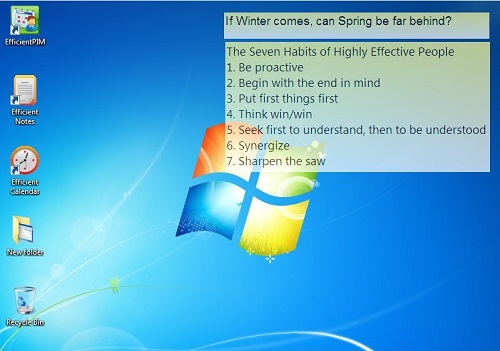 There is no point of using the traditional sticky notes as it is a boring format. Efficient Sticky Notes can help you in putting all those information on your desktop that are important and let you read when you need it. It can save your time as well as money.
Styles
The paper sticky notes which are available on your desktop do not have any charm to offer. Efficient Sticky Notes can make your desktop looks good as it can be customized with gradient effect, transparency, different font and also the background color. You can make the sticky notes look exactly in the way you want and which suits the style of your desktop.
Easy for Searching
Efficient Sticky Notes even come with capabilities of powerful search so that you can find the information that you need. You need to enter the things that you need to find out in the textbox and should press enter. The search function can easily figure out the information that you are searching for. It do not just help in sticking things on the desktop but can help in easily saving the notes that you may need later on.
Portable Edition
Efficient Sticky Notes come with a portable edition that can run easily from any of the flash drive. With the help of USB drive, there is a possibility for managing notes on different computers, and there is no need for worrying about synchronization of data. This can help you in handling various notes of yours at any place you need so that you can get exactly the kind of support that you need for dealing with various events.
Safety of Information
The Efficient Sticky Notes ensure you to have better safety of your information. There are chances for you to get the notes deleted by mistake; this should not lead to loss of your notes. These deleted notes would be saved within the recycle bin of the software so that you can access them if you need them in the future.
Styles of Interface
There are various styles of interface that you get with the software so that your individual needs can be satisfied. About ten different interfaces with different color tones are available with the software.
In short, just click New Sticky Notes, and check Show on Desktop, and you can stick your important notes, to-do lists, meetings, reminders and famous aphorism on the screen of your computers.